


Parental Control App: Mobicip
2.5676.00 Reviews
App Specs
- Version
- 2.4.14_r1286
- Updated On
- License
- Free
- Downloads
- 100,000+
- Developer
- Mobicip
- Categories
- Parenting
- Platform
- Android
Screenshots
 Analysis by AppCompare
In the world of digital parenting, finding the right tool to help keep your kids safe online can feel like searching for a needle in a haystack. But, let me tell you, Mobicip is one app that stands out in the crowd. If you're a parent who's trying to balance giving your kids freedom with ensuring their online safety, Mobicip might just be the app you've been looking for. Let's dive into what makes Mobicip a strong contender in the parental control arena.
Setting Up Mobicip
Getting started with Mobicip is a breeze. The app is available for both Android and iOS, so no matter what device your family uses, you're covered. After downloading the app, setting it up is straightforward. You create a family profile, add your children’s devices, and you’re ready to start monitoring.
What I love about Mobicip is how intuitive the setup process is. You don’t need to be a tech wizard to figure it out. The app guides you through each step, making it easy to customize settings based on each child's age and maturity level. The flexibility is great because, let’s face it, a one-size-fits-all approach just doesn’t work when it comes to kids.
The first-week appeal
In its first week, Mobicip can feel reassuring because it brings several different parenting concerns into one place: time limits, app blocking, web filtering, and location awareness. I can see the appeal for a household where a child has started using a phone more independently and the parent wants a few clear boundaries before handing over more freedom. Rather than repeatedly checking each device, a parent can set expectations and use the controls as a shared framework.
A practical way to begin is to start with only the rules you can explain easily. For example, set a screen-time boundary that matches your family’s existing routine, then add content restrictions that address your child’s age and needs. If you change everything at once, it becomes harder to tell which rule is causing frustration. The first few days are better treated as a conversation and adjustment period than as a test of how many controls you can turn on.
Features That Shine
One of the standout features of Mobicip is its comprehensive filtering system. It allows you to block inappropriate content across a wide range of categories. Whether it’s violence, gambling, or adult content, you can tweak the filters to suit your family’s needs. And the best part? It’s all done remotely. So, even if you’re on a business trip, you can still manage what your kids are accessing online.
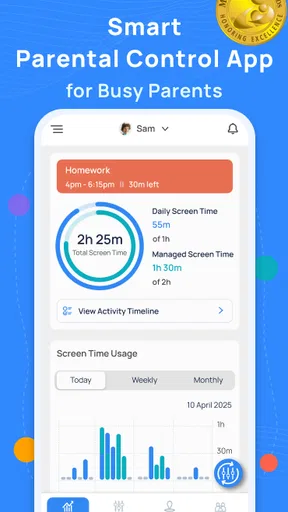
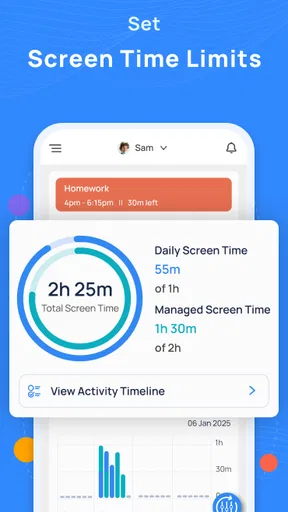
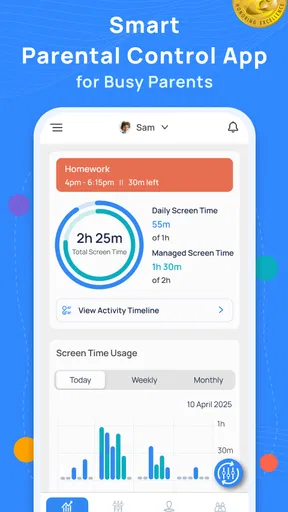
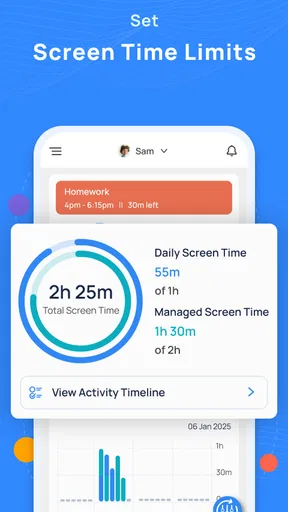
Another feature that’s worth mentioning is the screen time management. With Mobicip, you can set daily screen time limits and even schedule breaks. This feature is a lifesaver for maintaining balance in your kids' digital lives. No more arguing over screen time during dinner or late at night!
Worth Reading Before You Choose

EA SPORTS FC Mobile 26 Is a Bigger Football Game, but It Takes Time

Flipboard Shows What News Apps Must Do Beyond the Feed

Switching to Android Auto Means Rethinking Your Driving Routine

Google Calendar Makes a Crowded Week Easier to Manage

Ludo King Makes the Most of the Minutes Between Plans

Baby Panda World Brings Quick Play to Modern Phones, but Its Game Library Feels Busy
Value after the novelty wears off
The lasting value is less about checking a dashboard every day and more about whether the settings continue to support habits your family actually wants. A weekday limit, for instance, is useful only if it fits around homework, downtime, and the occasional change in plans. I would revisit the rules when school routines shift or a child’s independence grows, rather than treating the first setup as permanent.
Here’s a realistic everyday situation: a child gets home, uses a device for a while, and then needs to put it away for dinner. A time limit can reduce the need for a parent to be the sole referee, but it cannot settle every disagreement about what counts as reasonable use. I’d use the limit as a predictable boundary and explain it beforehand, instead of relying on a sudden restriction to end an argument. That keeps the app in a supporting role rather than making it the family’s enforcer.
Mobicip is a parenting app developed by Mobicip, and its focus is broader than a simple timer. The screen-time and filtering tools may be especially useful for families who want one place to manage online boundaries across a child’s device use. The app is free to install, while in-app purchases range from $0.99 to $94.99 per item, so I would check what is included in the option you intend to use before building a long-term routine around it.
Real-Time Monitoring and Alerts
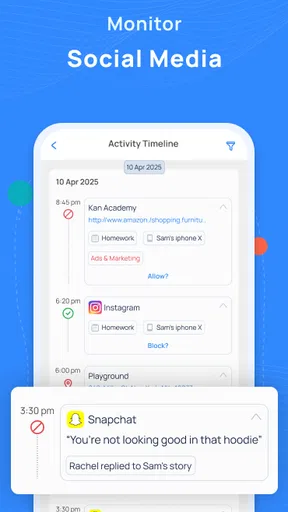
Mobicip offers real-time monitoring, giving you the ability to see what your kids are doing online at any moment. It’s like having a pair of eyes in the digital world. This feature is particularly useful for keeping tabs on your kids’ social media activities. If they’re spending too much time on platforms like Instagram or TikTok, you can step in and adjust their usage.
The app also sends you alerts for any suspicious activities. Whether it’s an attempt to access blocked content or excessive screen time, you’ll get a notification. This means you can address issues as they arise, rather than after the fact. It’s all about being proactive, which is crucial in today's fast-paced digital environment.
Keeping alerts useful, not exhausting
Alerts can be helpful when they point to something that needs a parent’s attention, but a constant stream of notifications can quickly become tiring. I’d decide in advance which events genuinely need an immediate response and which can wait until a planned check-in. That small habit helps prevent the app from turning ordinary device use into a series of interruptions for both parent and child.
Monitoring also has a trust trade-off. A younger child may need more active supervision, while an older one may respond better to clear limits and a conversation about why they exist. I would explain what I’m checking and what would lead me to change a rule. That makes the controls easier to understand and gives a child a path toward more independence, instead of leaving them to guess whether every online action is being watched.
Location Tracking and Geofencing
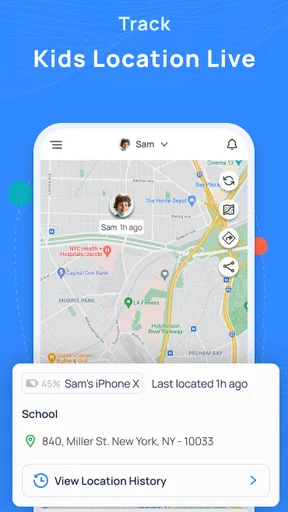
For those times when your kids are out and about, Mobicip’s location tracking feature is a real gem. It allows you to see where your kids are in real-time, giving you peace of mind. And if you really want to ensure their safety, you can set up geofences. This means you’ll get an alert if they leave a designated safe area, like home or school.
While some might see this as a little overbearing, it’s all about how you use it. I found it particularly useful for younger kids or if you’re in a new or unfamiliar area. It’s all about striking a balance between safety and trust.
I’d treat location tools as a practical check for specific situations, not as a substitute for agreeing on where a child is going and when they expect to arrive. For a younger child walking a familiar route, a location alert may help a parent feel more comfortable. For a teenager who can communicate directly, frequent tracking may feel intrusive and create more tension than reassurance. The right choice depends on age, circumstances, and an honest family discussion.
Maintenance and everyday friction
Parental controls need occasional attention because family routines change. A setting that worked during a quiet school week may not make sense during a holiday or a different activity schedule. I would review the limits when plans change, check whether blocked categories still fit the child’s needs, and talk through any rule that is repeatedly causing conflict. This is more sustainable than making frequent reactive adjustments after a frustrating evening.
There is also a balance between broad filtering and access to legitimate material. A filter that is too strict can get in the way of school research or ordinary browsing, while a permissive setup may not offer the reassurance a parent expects. If a useful page or app is blocked, I’d treat that as a prompt to review the rule together rather than immediately switching off protection altogether. The point is to make the settings fit real use, not to chase a perfect configuration.
Compared with using only the built-in screen-time controls on a phone, Mobicip’s appeal is having filtering and location-related tools alongside time management. A basic timer may be enough for a family whose only concern is when a device is used. On the other hand, families seeking broader parental oversight may prefer having several kinds of control in one app. That convenience comes with a maintenance cost: more controls mean more decisions about what to monitor and when to revisit the rules.
Ease of Use and User Interface
Let’s talk about the user interface, because if an app isn’t easy to use, it’s not going to get used. Mobicip’s interface is clean and straightforward. The dashboard is easy to navigate, and all the features are just a tap away. I didn’t find myself scratching my head trying to figure out where to go or what to do next. It’s all laid out in a way that makes sense, which is a huge plus in my book.
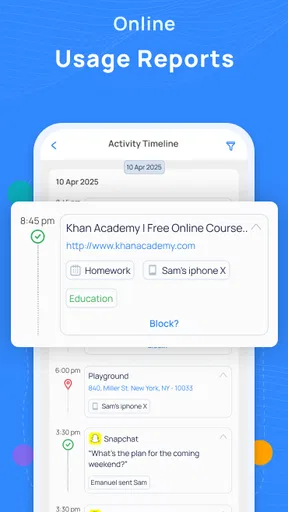
Plus, the app provides detailed reports and analytics on your kids’ online activities. This is perfect for staying informed and making data-driven decisions about how to manage your family’s digital habits.
Who is likely to keep using it?
I see Mobicip as a better fit for parents who want a combination of web restrictions, screen-time boundaries, and location awareness, and who are comfortable discussing those controls with their children. It may also suit a family managing several different concerns at once, because a unified set of parental controls can be easier to revisit than a patchwork of separate rules.
I would skip it if you want only a simple timer, dislike monitoring tools, or expect parental controls to work without regular conversations and occasional adjustments. A built-in device setting may be enough for the first case. For the other two, no app can remove the need to agree on boundaries or decide what level of oversight feels fair. Mobicip can help carry out a family’s choices; it cannot make those choices for you.
It is also worth setting expectations about the app itself. Mobicip has an average rating of 2.5 from around 2.4 thousand ratings, and it has over 100 thousand installs. Those figures are a reason to approach it thoughtfully rather than assume it will suit every household. I’d try the parts that matter to your family and judge the experience by whether the controls are understandable and manageable in your routine.
Final Thoughts
In a world where online safety is paramount, Mobicip offers a comprehensive solution that’s both effective and user-friendly. From powerful content filtering and screen time management to location tracking and real-time alerts, this app has it all. It’s like having a digital guardian angel watching over your kids.
Of course, no app can replace the importance of open communication between parents and kids about online safety. But Mobicip definitely provides the tools to facilitate those conversations and keep your kids safe in the digital world. If you’re on the fence about parental control apps, give Mobicip a try. It could very well be the peace of mind you’ve been searching for.
Mobicip has been available since December 20, 2013, and its current version is 2.4.14_r1286, with Android 5.0 as the minimum operating system requirement. It is rated for Everyone. Those details make it worth checking device compatibility before setting it up, especially if a child uses an older Android phone. I’d also keep in mind that family needs evolve: an app that feels helpful at first can become a source of fatigue if nobody revisits the rules or explains why they are there.
For me, the deciding question is not whether a parental-control app can prevent every problem; none can. It is whether the mix of controls earns a lasting place in the household without replacing trust or creating a daily chore. Mobicip is most compelling when its filters, time limits, and location tools address real concerns and are used with restraint. If you can keep the settings aligned with your child’s age and your family’s routine, it may remain useful after the first-week reassurance fades. If the controls bring more arguments than clarity, a simpler approach is likely the better choice.
Pros
- User-friendly interface for easy setup.
- Customizable screen time limits.
- Real-time location tracking feature.
- Comprehensive web filtering options.
- Supports multiple devices and platforms.
Cons
- Limited free version features.
- Occasional app performance lags.
- Some websites bypass filters.
- Complex settings for novices.
- Premium features require subscription.
FAQs for Parental Control App: Mobicip
What features does Mobicip offer for parental control?
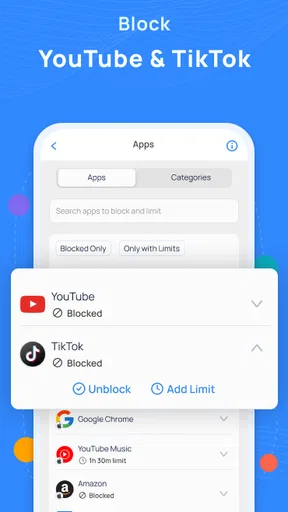
Mobicip provides a comprehensive suite of features designed to help parents monitor and control their children's online activities. These include web filtering, screen time management, app blocking, location tracking, and activity reports. Parents can set up custom filters for different age groups and receive alerts about potentially harmful content.
Is Mobicip compatible with multiple devices and platforms?
Yes, Mobicip is compatible with a wide range of devices and platforms, including Android, iOS, Windows, Mac, and Chromebooks. This allows parents to seamlessly manage and synchronize settings across all devices used by their children, ensuring consistent protection and monitoring.
How user-friendly is Mobicip for parents who are not tech-savvy?
Mobicip is designed with a user-friendly interface that simplifies the setup and management process. The app provides step-by-step guides and tutorials to assist parents in configuring parental controls. The dashboard is intuitive, making it easy for users to monitor activities and make adjustments as needed.
Can Mobicip help limit screen time for children?
Absolutely. Mobicip allows parents to set daily screen time limits and schedule specific periods when device usage is allowed. This feature helps promote a healthy balance between online activities and other important aspects of a child's life, such as homework and family time.
What makes Mobicip stand out compared to other parental control apps?
Mobicip stands out due to its robust feature set, ease of use, and cross-platform compatibility. It provides comprehensive monitoring tools and customizable settings, allowing parents to tailor the app to their family's specific needs. Additionally, Mobicip offers excellent customer support and constant updates to enhance user experience and security.


